See it in action.
Super quick, intuitive, and flowy execution.
Appears at your cursor.
Anywhere, ultra-fast.
Press ⌥V and a glassy panel springs in exactly where you're working. Navigate fluidly with arrows, paste multiple formats instantly, or drag to resize your workflow. Super convenience anywhere and fast — it vanishes perfectly when you're done.
Always one click away.
Search. Edit. Pin.
Click the native Apple-style menu bar icon for full history tracking. Expand Code Views, edit entries directly without leaving the app, and dynamically unpin content to paste across complex documents without ever losing your context.
Bulk copy. Selective paste.
Hold ⌘ for checkboxes.
Copy 6 files, 10 files, even 20 — they all group neatly into a single clipboard entry. Expand to see every file. Hold ⌘ to reveal dynamic tick boxes, pick exactly what you need, then paste the selected items in one shot. Text, images, and files all work.
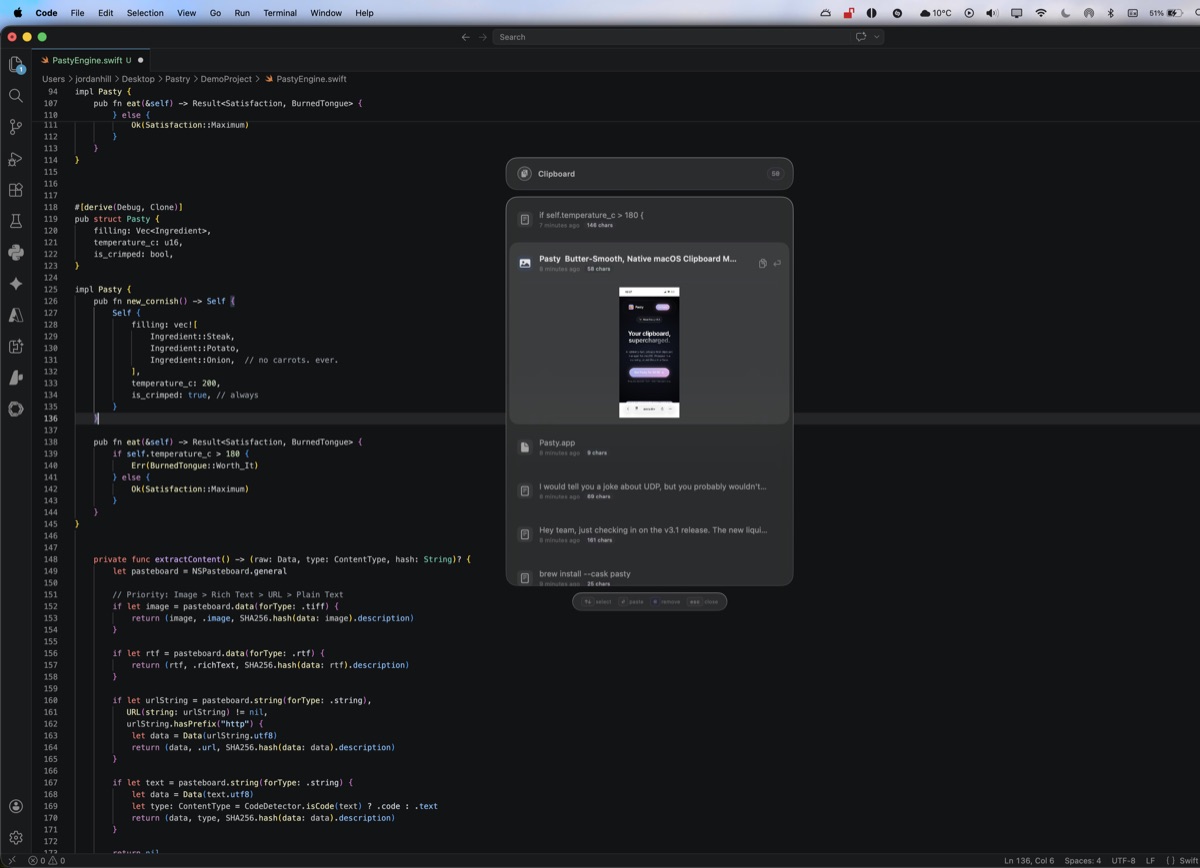
Infinite Formats
Copy links, pictures, apps, and rich text flawlessly with one keystroke.
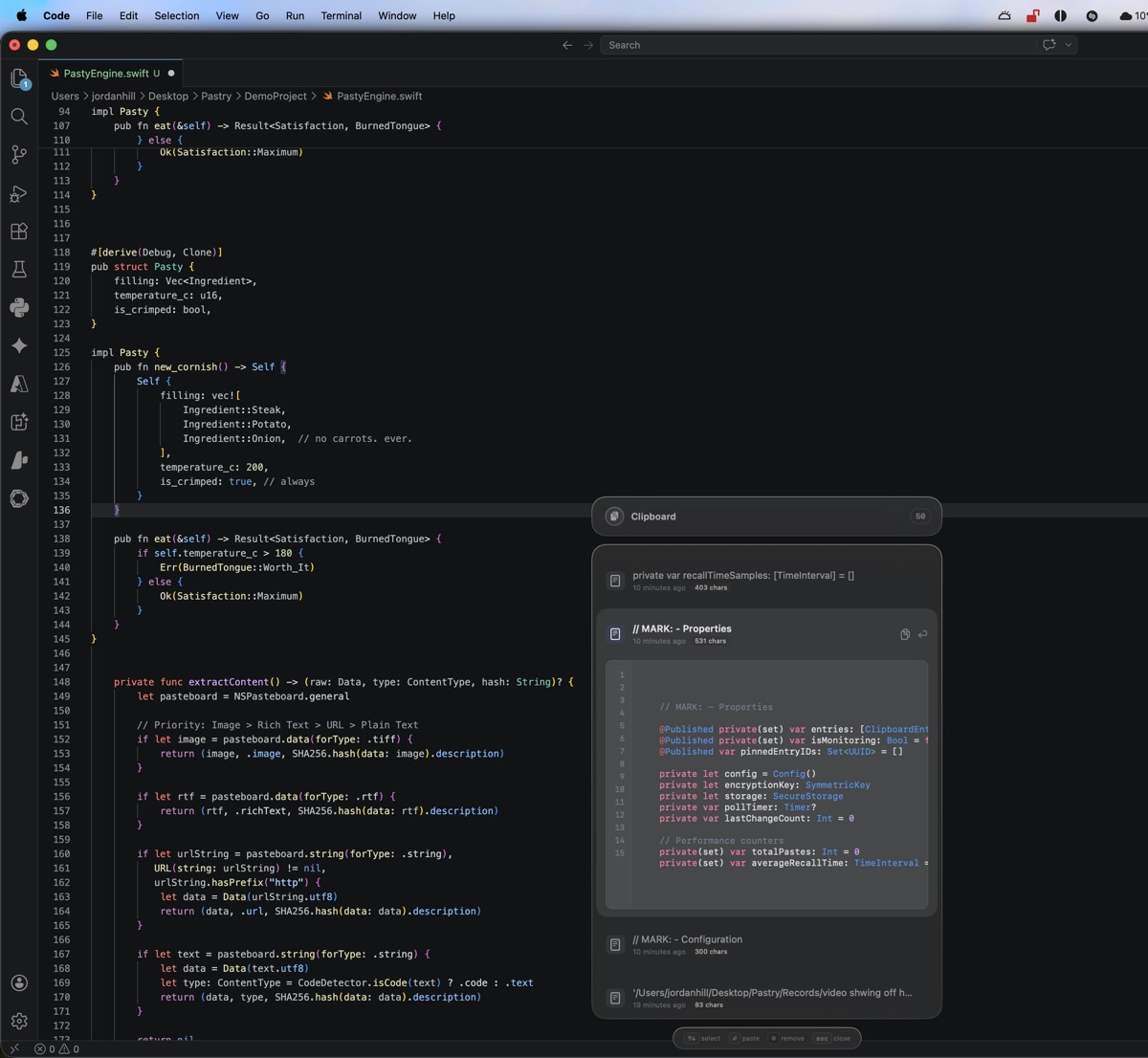
Rich Syntax View
Auto-detected syntax highlighting with line numbers across 30+ languages.
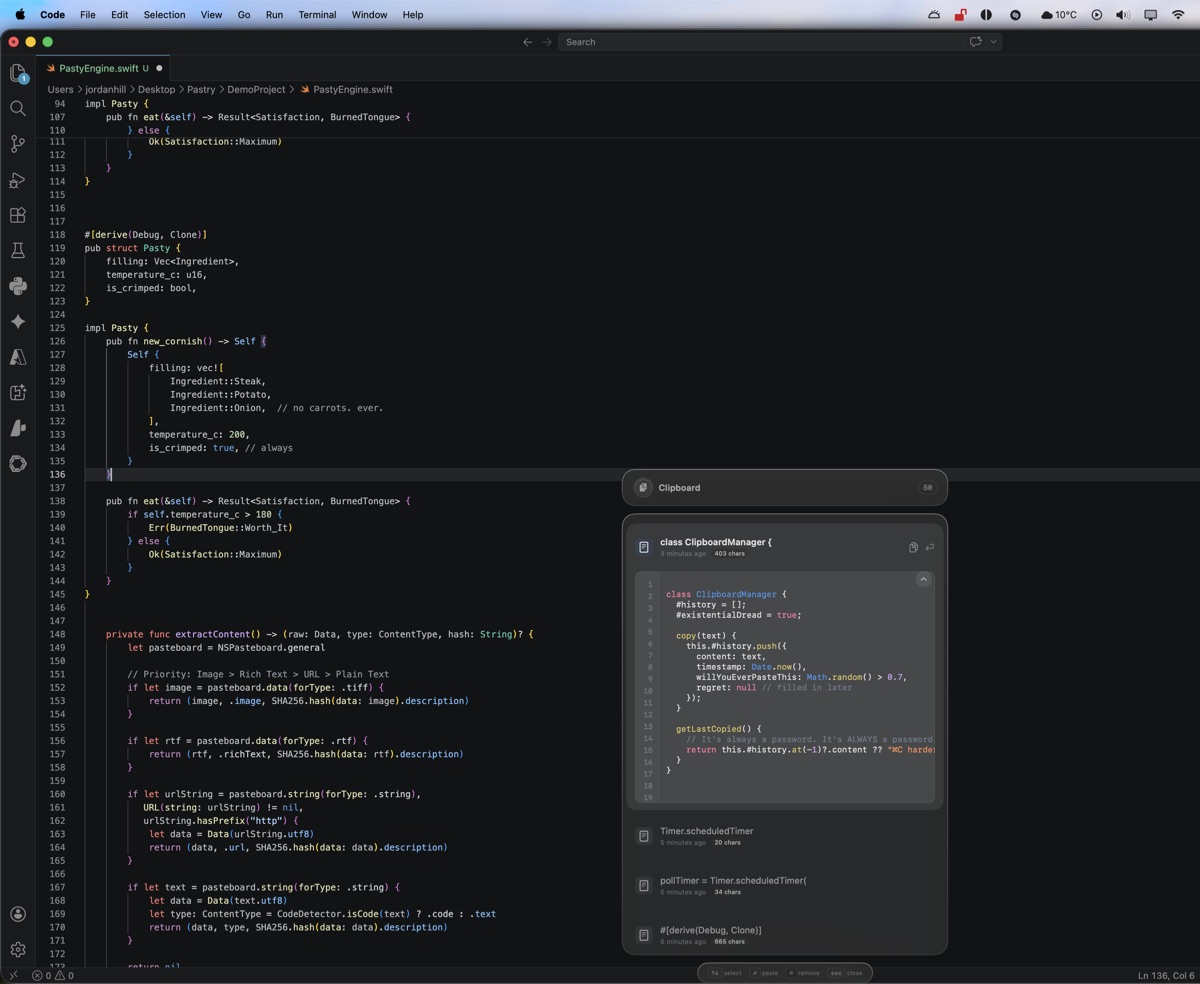
Always on Top
Pin your panels so you can paste across documents without losing context.
More features. Less weight.
Pasty packs the most functionality per megabyte of any clipboard manager on macOS.
The number at the end is how much of your Mac's memory it uses.
The takeaway: Pasty gives you 10 features for just 70 MB. Paste gives you 3 for 200 MB. That's 5× more value per megabyte.
macOS 14.2, M3 MacBook Pro, 16GB. Launch = time-to-interactive from hotkey. CPU over 60s idle. Feature count = distinct premium capabilities beyond basic copy/paste history.
How Pasty stacks up.
See why developers are switching from Electron-based clipboard managers.
 Pasty
Pasty
|
Maccy | Paste | CopyClip | |
|---|---|---|---|---|
| Built with | Native Swift | Swift | Electron | Objective-C |
| Memory usage | ~70 MB | ~50 MB | ~200 MB | ~30 MB |
| Features included | 10 premium | 2 basic | 3 basic | 1 basic |
| Multi-file batch paste | ✓ ⌘ tick select | — | — | — |
| Screenshot & recording capture | ✓ auto | — | — | — |
| Video previews | ✓ | — | — | — |
| 120Hz ProMotion | ✓ | — | — | — |
| Syntax highlighting | ✓ 30+ langs | — | — | — |
| Liquid Glass UI | ✓ | — | — | — |
| Pin & expand previews | ✓ | — | ✓ | — |
| AES-256 encryption | ✓ | — | — | — |
| 100% offline | ✓ | ✓ | — | ✓ |
| Pricing | $9.99 once | Free | $3.99/mo | Free |
Designed for speed.
Everything you copied, exactly when you need it.
Blistering Fast Execution
Written entirely in native macOS Swift. Pasty is 3× lighter than Paste while packing 4× more features — and launches the exact millisecond you press ⌥V. A hyper-optimised clipboard loop captures your data instantly without ever interrupting your workflow.
Save Hours
Never type the same email, link, or terminal command twice. Scroll through your last 50 pastes with frictionless ease.
Zero Cloud. Zero Trust Needed.
Pasty runs entirely offline. Your data is AES-256 encrypted and stored locally on your Mac — it never touches a server, ever.
Liquid Glass & 120Hz ProMotion
A true love letter to macOS UI design. Pasty leverages hardware-accelerated Metal compositing and authentic background refraction to deliver flawlessly smooth 120Hz animations. Spring physics, blur compositing, and haptic-feeling transitions make it feel inextricably tied to the native OS.
Cursor-Anchored Panel
Press ⌥V and the panel spawns at your cursor. Arrow keys to navigate, Enter to paste. Mouse away and it melts into the background.
AES-256 Privacy Vault
Every paste encrypted at rest. No analytics, no telemetry, no tracking. Sandboxed natively on Apple Silicon.
Screenshot & Recording Capture
Every ⌘⇧3/4/5 screenshot and screen recording lands directly in your Pasty history with rich thumbnail previews. Supports .mov and .mp4 video files. Preview, Markup, Share, or paste images directly into Finder, chat apps, and editors — no digging through Desktop folders.
Drag to Resize
Grab any edge or corner. Both panels remember your preferred size between sessions.
Built for Developers
Pasty auto-detects code snippets and renders them with full syntax highlighting across 30+ languages — Swift, Python, JavaScript, Rust, Go, and more. Line numbers, keyword colouring, string highlighting — all rendered at native frame rate.
Bulk Copy & Selective Paste
Copy 6 files at once — they group into a single tidy entry showing every filename. Hold ⌘ to reveal dynamic tick boxes that pop up on each item. Select exactly what you need, then hit "Paste Selected" to drop them all in one shot. Works with files, text, images — anything on your clipboard. Multi-text entries work the same way.
Pin & Expand
Hover any paste to peek. Click to pin it open with fluid spring animations that feel alive and organic.
Three keystrokes. That's it.
Pasty lives in your muscle memory, not your way.
Copy anything
Text, code, images, file paths — Pasty silently captures everything you ⌘C. No action needed.
Press ⌥V
The glass panel appears at your cursor with your full history. Arrow keys to browse, search to filter.
Enter to paste
Pasty pastes it directly into the target app via native CGEvent injection. The panel vanishes instantly.
Frequently asked questions.
Everything you need to know before you buy.
What makes Pasty different from other clipboard managers?
Pasty is built entirely in native Swift with Metal 3 GPU compositing — not Electron, not a web wrapper. It packs 4× more features per megabyte than any competitor, launches in under 16ms, and renders at 120Hz on ProMotion displays. It includes syntax highlighting for 30+ languages, video & image previews, pin & expand, AES-256 encryption, and resizable panels.
Is there a free trial?
Yes! Pasty includes a 7-day free trial with full functionality — no credit card required, no sign-up. Just download and start using it. When the trial ends, enter a $9.99 lifetime license key to keep using Pasty forever.
Is Pasty a subscription?
No. Pasty starts with a free 7-day trial, then it's a one-time purchase of $9.99. You get a lifetime license key that unlocks the app on your device — no recurring fees, no auto-renewals, no surprise charges. Every future update is included.
Does Pasty send my clipboard data anywhere?
Absolutely not. Pasty runs 100% offline with zero network calls. Your clipboard data is encrypted with AES-256 and stored locally on your Mac. There is no analytics, no telemetry, no tracking of any kind. We never see your data.
What macOS version do I need?
Pasty requires macOS 14.0 (Sonoma) or later. It runs natively on Apple Silicon (M1, M2, M3, M4) and Intel Macs. ProMotion 120Hz animations are available on supported displays.
How does the hotkey panel work?
Press ⌥V (Option+V) anywhere on your Mac and a floating glass panel appears at your cursor position. Use arrow keys to navigate your clipboard history, type to search, and press Enter to paste the selected item directly into the target application. The panel disappears instantly after pasting.
Can Pasty highlight code snippets?
Yes! Pasty auto-detects code in your clipboard and renders it with full syntax highlighting — line numbers, keyword colouring, string highlighting — across 30+ languages including Swift, Python, JavaScript, TypeScript, Rust, Go, C++, and more.
Can Pasty paste multiple files at once?
Yes! In v3.5, copying multiple files groups them into a single clipboard entry. Expand the entry to see every file, then click Paste All to paste them into any Finder window or app in one single action.
What are the ⌘-hold tick boxes?
Hold the ⌘ (Command) key to optionally reveal dynamic checkboxes on each clipboard item. Select exactly the items you need — whether files, text, or images — then paste your custom batch selection in a single action. It works flawlessly in both the hotkey panel and the menu bar popover.
Does Pasty capture screenshots and screen recordings?
Yes! Every ⌘⇧3, ⌘⇧4, and ⌘⇧5 screenshot and screen recording is automatically captured by Pasty with rich thumbnail previews. It's fully compatible with the macOS screenshot utility, so you can always paste your captures directly from your clipboard history.
Developers, rejoice.
Install securely in seconds.
==> Installing Cask pasty
🍺 pasty was successfully installed!
One price. Yours forever.
No subscriptions. No recurring fees. Just software done right.
Lifetime License
Pay once, own it forever. No subscriptions, no tracking — just pure Mac craft.
- Unlimited clipboard history
- Beautiful Liquid Glass UI
- Syntax-highlighted code view (30+ languages)
- Pin & expand live previews
- Global hotkey access (⌥V)
- AES-256 encrypted & 100% offline
- Resizable panels — drag any edge
- Lifetime updates — every future version included
- Support an indie developer ♥
Start with a free 7-day trial. No credit card needed.
Secure checkout via Lemon Squeezy · Instant license key delivery